Category: FullStack

  • Building the RNA-Bee Web Platform


    INSERT: RNA-Bee Web Platform Hero Pattern


    Building the RNA-Bee Web Platform

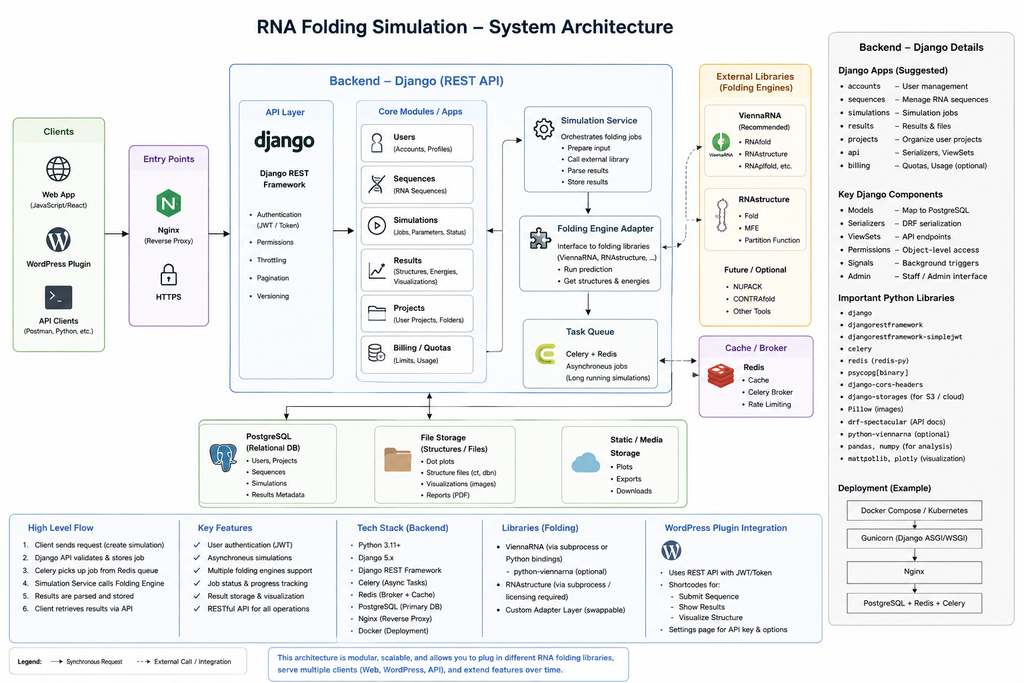
    RNA-Bee is not only a simulation engine. It is a complete web platform designed to make computational RNA experiments accessible through a browser while keeping the scientific backend independent from the public website.

    The platform combines WordPress, Django REST Framework, PostgreSQL, MariaDB, Redis, Celery and Docker Compose behind a single public HTTPS endpoint.


    INSERT: Full Web Platform Diagram


    The web platform has two faces

    RNA-Bee exposes one public website, but internally two applications cooperate.

    WordPress

    WordPress handles the visible website: pages, navigation, project presentation and the block-based interface that users interact with.

    Django REST

    Django handles the scientific application layer: API endpoints, experiment models, validation, persistence and orchestration of computational work.

    This separation allows each side to remain focused. WordPress does not become a scientific backend, and Django does not need to solve content management, page building and editorial workflows.


    One domain, different routes

    Users reach RNA-Bee through one HTTPS domain. Apache acts as the public reverse proxy and decides which application receives each request.

    https://rna-bee.nathabee.de/
            |
            v
    Apache
            |
            +---- /       → WordPress
            |
            +---- /api/   → Django REST API

    This produces a simple browser experience while preserving a clean backend boundary.

    The WordPress interface can call the API using normal HTTP requests without exposing internal services such as PostgreSQL or Redis to the internet.


    INSERT: Apache Reverse Proxy / Request Routing Image


    Why WordPress for the frontend?

    RNA-Bee uses WordPress as a frontend because the public site needs more than a single application screen. It also needs normal website capabilities such as project pages, explanations, navigation, reusable design patterns and eventually dedicated blocks for scientific interaction.

    • Block-based page construction
    • Reusable Gutenberg patterns
    • Custom RNA-Bee blocks
    • Theme-based visual identity
    • Accessible editorial content without changing backend code

    The important architectural decision is that WordPress remains the interface layer. Scientific state and simulation logic stay behind the API.


    Why Django REST for the application backend?

    The scientific side of RNA-Bee belongs naturally in Python because the broader computational biology ecosystem is strongly represented there.

    Django provides the application framework around that scientific code, while Django REST Framework exposes the operations through a structured HTTP API.

    • Validate RNA sequences and experiment parameters
    • Create and retrieve experiments
    • Persist simulation metadata
    • Start asynchronous jobs
    • Expose progress and results to the frontend
    • Provide a stable boundary around the scientific engine
    WordPress block
          |
          | HTTP / JSON
          v
    Django REST API
          |
          +---- experiment data
          |
          +---- simulation jobs
          |
          +---- result retrieval

    Keeping long-running work out of HTTP requests

    Scientific computation does not fit well into a normal request-response cycle. A simple folding prediction may be fast, but evolutionary experiments can require repeated calculations across many sequences and generations.

    Instead of making the browser wait for the complete computation, RNA-Bee delegates longer jobs to Celery workers.

    Browser
       |
       v
    POST /api/experiments/
       |
       v
    Django validates request
       |
       v
    Experiment saved
       |
       v
    Task sent to Redis
       |
       v
    Celery worker executes simulation
       |
       v
    Results persisted
       |
       v
    Frontend requests status/result

    This gives the platform a much cleaner execution model. A web request can finish quickly while the experiment continues independently in the background.


    INSERT: Async Experiment Lifecycle Diagram


    Redis as the message broker

    Redis provides the communication layer between Django and the Celery workers.

    Django does not need to know which worker will execute a task. It submits the job, Redis makes it available to the queue, and an available Celery worker takes responsibility for the computation.

    Django
       |
       v
    Redis queue
       |
       v
    Celery worker

    This loose coupling also makes it possible to add more workers later without changing the public API.


    PostgreSQL for scientific application data

    The Django application uses PostgreSQL for structured simulation and application data.

    • Experiments
    • RNA sequences
    • Predicted structures
    • Generations
    • Fitness values
    • Mutation history
    • Simulation status
    • Reproducibility metadata

    This data belongs to the scientific application, not to the content-management system.


    MariaDB stays with WordPress

    WordPress keeps its own MariaDB database for normal CMS responsibilities such as pages, menus, users, settings and editorial content.

    Using two databases may appear redundant, but it preserves an important boundary:

    Website content belongs to WordPress. Scientific experiment data belongs to the RNA application.

    Neither application needs direct database access to the other. Integration happens through application interfaces instead of shared tables.


    Docker Compose ties the platform together

    All application services are described through Docker Compose. This keeps the runtime environment explicit and reproducible.

    • wordpress — public WordPress application
    • wordpress-db — MariaDB for WordPress
    • django — Django REST application
    • celery-worker — asynchronous simulation execution
    • postgres — Django and simulation database
    • redis — task broker

    The containers can be rebuilt independently while persistent state remains in dedicated volumes.


    INSERT: Docker Compose Services Diagram


    Private Docker networks

    Not every service needs to communicate with every other service. RNA-Bee uses network boundaries so that services are connected only where necessary.

    Frontend network
       |
       +-- WordPress
       +-- Django
    
    Backend network
       |
       +-- Django
       +-- Celery
       +-- PostgreSQL
       +-- Redis
    
    WordPress DB network
       |
       +-- WordPress
       +-- MariaDB

    This makes dependencies clearer and reduces accidental exposure between unrelated services.


    Only the web layer is exposed

    PostgreSQL, MariaDB, Redis and Celery do not need public internet access.

    The host exposes only the web applications locally, and Apache publishes those applications through HTTPS.

    Internet
       |
       v
    Apache :443
       |
       +---- WordPress container
       |
       +---- Django container
    
    PostgreSQL   private
    MariaDB      private
    Redis        private
    Celery       private

    This keeps infrastructure services behind the application boundary instead of turning every Docker port into a public service.


    Persistent data and disposable containers

    One of the useful properties of the Docker model is the distinction between applications and data.

    Containers can be recreated. Important data must survive independently.

    • MariaDB data
    • PostgreSQL data
    • WordPress files and uploads
    • Redis state where persistence is useful
    • Generated simulation results

    These are stored separately from the short-lived container filesystem, so rebuilding an application image does not imply losing the project state.


    A development and deployment workflow built around Git

    The reproducible platform also changes how RNA-Bee is developed.

    Local development
          |
          v
    Git commit
          |
          v
    GitHub repository
          |
          v
    VPS git pull
          |
          v
    Docker Compose rebuild / restart

    Application code, Docker configuration, the WordPress child theme and project-specific plugins can be versioned together, while runtime data remains outside Git.

    This creates a useful boundary between what defines the application and what the running application produces.


    WordPress as a programmable interface

    The long-term WordPress role goes beyond presenting static project pages.

    RNA-Bee can expose scientific functionality through dedicated Gutenberg blocks. A block can collect experiment parameters, call the Django API and render the returned state or results inside the website.

    RNA-Bee Gutenberg Block
            |
            +-- RNA sequence
            +-- experiment settings
            +-- start action
            |
            v
    Django API
            |
            v
    Experiment
            |
            v
    Result
            |
            v
    Visualization block

    This approach keeps the user experience native to WordPress while ensuring that the scientific implementation remains in Python.


    INSERT: Future RNA-Bee Gutenberg Simulation Block Screenshot


    Why this platform fits an experimental project

    RNA-Bee is expected to change as new experiments and interfaces are added. The platform therefore needs to support iteration without forcing every change into one monolithic application.

    • WordPress can evolve independently as the interface changes.
    • Django can evolve independently as experiment models become richer.
    • Celery workers can scale independently as computation becomes more expensive.
    • Scientific adapters can change without redesigning the public website.
    • Docker keeps the runtime reproducible while the project grows.

    The browser sees one RNA-Bee application; internally, each layer remains responsible for a different part of the problem.


    The platform is the foundation, not the experiment

    The web platform is now capable of hosting the project, serving the frontend and API, persisting application state and executing asynchronous jobs. But infrastructure alone does not make RNA-Bee scientifically interesting.

    The next milestones move back toward the experiments themselves: the first real folding workflow, mutation and selection models, RNA structure visualization and reproducible evolutionary runs.


    The RNA-Bee series

    1. Introducing RNA-Bee — the project, RNA folding, evolution and its goals
    2. RNA-Bee Architecture — system architecture and technical decisions
    3. Building the RNA Simulation Engine — ViennaRNA, RNAstructure, mutation, folding, fitness and evolution
    4. Building the RNA-Bee Web Platform — Docker, Django REST, Celery, Redis and WordPress integration

    Future build notes

    As RNA-Bee moves from platform setup into actual experiments, individual milestones can be documented separately.

    • RNA-Bee: First folding experiment
    • RNA-Bee: Mutation and selection model
    • RNA-Bee: Building the WordPress simulation block
    • RNA-Bee: Visualizing RNA structures
    • RNA-Bee: Reproducible experiments
    Project links

    Open RNA-Bee

    View source on GitHub

  • RNA-Bee Architecture


    INSERT: RNA-Bee Hero / Architecture Pattern


    RNA-Bee Architecture — separating the web platform from scientific computation

    RNA-Bee is built as a containerized multi-service application. The architecture deliberately separates the public website, API, persistence, asynchronous workloads and scientific computation instead of placing everything inside a single application.

    The goal is not maximum complexity. It is clear responsibility: each component should do one job well and remain replaceable as the project evolves.


    The architecture at a glance

    The application is divided into two main layers: a public web layer and a computational backend.

    • WordPress handles the public website and block-based user interface.
    • Django REST Framework provides the application API and coordinates simulation logic.
    • PostgreSQL stores application and scientific experiment data.
    • Redis acts as the message broker for asynchronous jobs.
    • Celery workers execute computational tasks outside normal web requests.
    • ViennaRNA and other scientific tools provide the actual RNA algorithms.
    • MariaDB stores the WordPress application data.
    • Apache provides the public HTTPS entry point and routes requests to the correct service.

    One public endpoint, two applications

    From the browser, RNA-Bee looks like a single website. Internally, however, normal website requests and API requests are handled by different applications.

    https://rna-bee.nathabee.de/
            |
            +---- /       → WordPress
            |
            +---- /api/   → Django REST API

    Apache sits in front of the Docker services and acts as the reverse proxy. This keeps the individual containers private while exposing only the routes that visitors actually need.

    The routing decision is simple but important: WordPress remains responsible for pages, navigation and interaction, while scientific requests are directed to the Python backend.


    INSERT: Reverse Proxy / Request Flow Diagram


    Why WordPress and Django?

    Using WordPress and Django together may initially look unusual, but the two systems solve very different problems.

    WordPress

    • Pages and navigation
    • Gutenberg blocks
    • Content and documentation
    • Interactive project interface
    • Theme and visual presentation

    Django

    • Scientific application logic
    • REST API
    • Experiment models
    • Simulation orchestration
    • Integration with Python scientific libraries

    The separation keeps WordPress out of scientific computation and avoids forcing the Django backend to become a content-management system.


    Asynchronous computation with Celery and Redis

    Some RNA calculations may finish quickly, while others can involve many sequences, generations or repeated folding operations. Those workloads should not keep a browser request open until the entire simulation finishes.

    RNA-Bee therefore separates web requests from computational jobs.

    User starts experiment
            |
            v
    Django API
            |
            v
    Create job
            |
            v
    Redis queue
            |
            v
    Celery worker
            |
            v
    RNA computation
            |
            v
    Store result

    Django can accept an experiment, validate it and create a job. A Celery worker then performs the actual computation independently. The frontend can query the API for progress and results without tying the lifetime of the experiment to a single HTTP request.


    INSERT: Celery Job Flow Diagram


    Two databases for two responsibilities

    RNA-Bee deliberately does not force WordPress and the scientific backend into the same database.

    MariaDB

    MariaDB belongs to WordPress and stores normal CMS data such as pages, configuration, users and site content.

    PostgreSQL

    PostgreSQL belongs to Django and is intended for simulation runs, experiment definitions, sequences, generations, computed properties and other application-specific data.

    This boundary prevents scientific domain models from becoming dependent on WordPress tables and makes the Python application easier to test, migrate and evolve independently.


    Keeping the scientific engines replaceable

    The computational layer should not be tightly coupled to one RNA library. RNA-Bee is designed so that the simulation engine can ask for operations such as folding or scoring through a defined application interface.

    Simulation Engine
            |
            v
    RNA prediction interface
            |
            +---- ViennaRNA adapter
            |
            +---- RNAstructure adapter
            |
            +---- future engines

    This adapter-based approach allows the project to begin with ViennaRNA while leaving room for comparison, validation or additional scientific engines later.

    The simulation model should therefore understand concepts such as sequence, structure, energy and fitness, but it should not need to know the command-line details or API conventions of a particular external library.


    Docker as the application boundary

    RNA-Bee uses Docker Compose to describe the complete runtime environment. Each major responsibility runs in its own service while persistent data is stored outside the disposable container filesystem.

    • WordPress
    • WordPress MariaDB
    • Django API
    • Celery worker
    • PostgreSQL
    • Redis

    This makes the application reproducible: the same project definition can be used for development, testing and deployment without manually rebuilding the entire server environment.


    INSERT: Docker Services / Networks Diagram


    Public services and private services

    Not every container should be reachable from the internet.

    Only the public web interfaces need host-level access. Databases, Redis and background workers remain internal to the Docker environment and communicate over private networks.

    • Public through Apache: WordPress
    • Public through Apache: Django API
    • Private: PostgreSQL
    • Private: MariaDB
    • Private: Redis
    • Private: Celery workers

    This reduces the exposed attack surface and keeps infrastructure components behind the application boundary.


    Persistence without treating containers as servers

    Containers are replaceable. Data is not.

    RNA-Bee therefore keeps persistent state in dedicated Docker volumes rather than relying on the writable filesystem of a particular container instance.

    • WordPress database data
    • WordPress uploads and runtime files
    • PostgreSQL application data
    • Redis persistence where required
    • Simulation-generated files and results

    A service can therefore be rebuilt or upgraded without implying that its application data should disappear with it.


    Design principles behind the architecture

    • Separation of concerns — presentation, API, data and computation remain distinct.
    • Replaceability — individual scientific engines and infrastructure components should be exchangeable.
    • Reproducibility — the environment is described as code rather than reconstructed manually.
    • Asynchronous by design — expensive simulation work does not belong in browser request lifecycles.
    • Minimal exposure — databases and infrastructure services remain private.
    • Independent evolution — the WordPress interface and Python scientific backend can change at different speeds.

    The architecture is intentionally modular: the web interface asks for scientific work, but it does not perform the science itself.


    Where the architecture goes next

    The infrastructure is only the foundation. The next major architectural work happens inside the scientific domain: defining sequences and experiments, implementing folding adapters, representing mutation and fitness, and designing evolutionary runs that remain reproducible.

    That is the subject of the next article in the RNA-Bee series.


    INSERT: Link / Button to “Building the RNA Simulation Engine”


    The RNA-Bee series

    1. Introducing RNA-Bee — the project, RNA folding, evolution and its goals
    2. RNA-Bee Architecture — system architecture and technical decisions
    3. Building the RNA Simulation Engine — ViennaRNA, RNAstructure, mutation, folding, fitness and evolution
    4. Building the RNA-Bee Web Platform — Docker, Django REST, Celery, Redis and WordPress integration

    Project links

    Open RNA-Bee

    View source on GitHub

  • SpaghettiChef

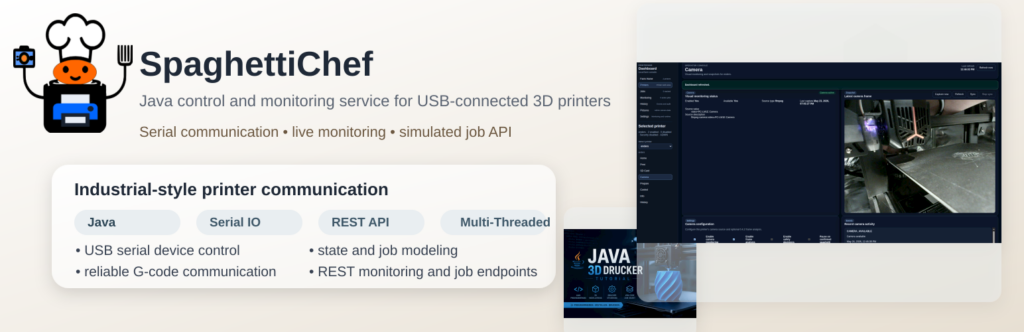
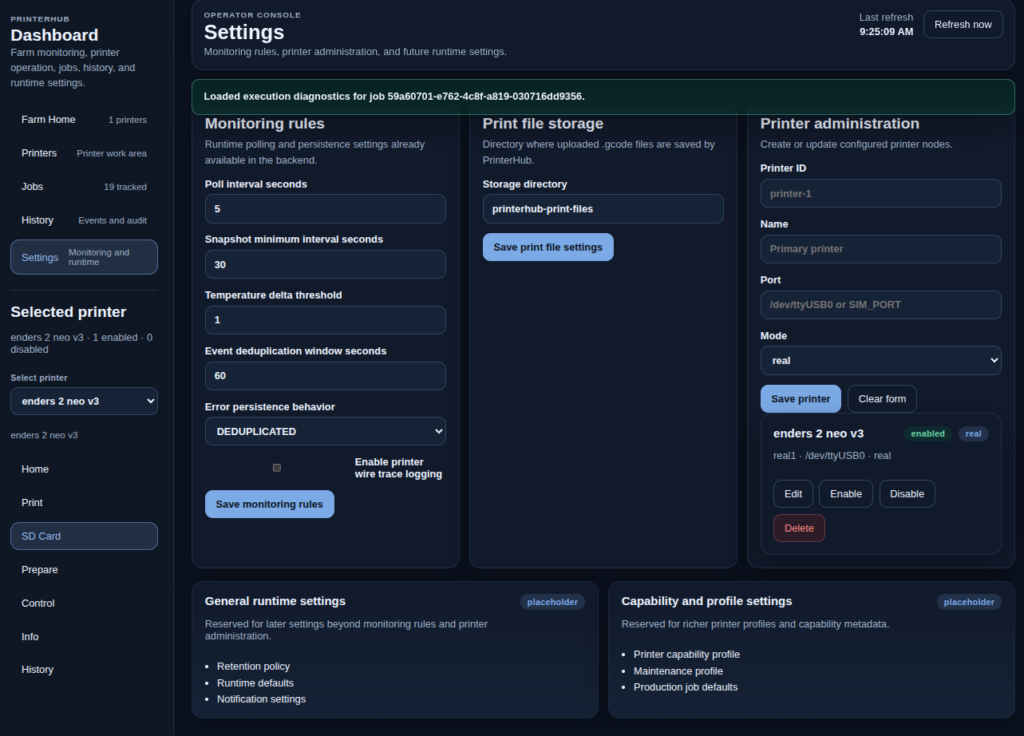
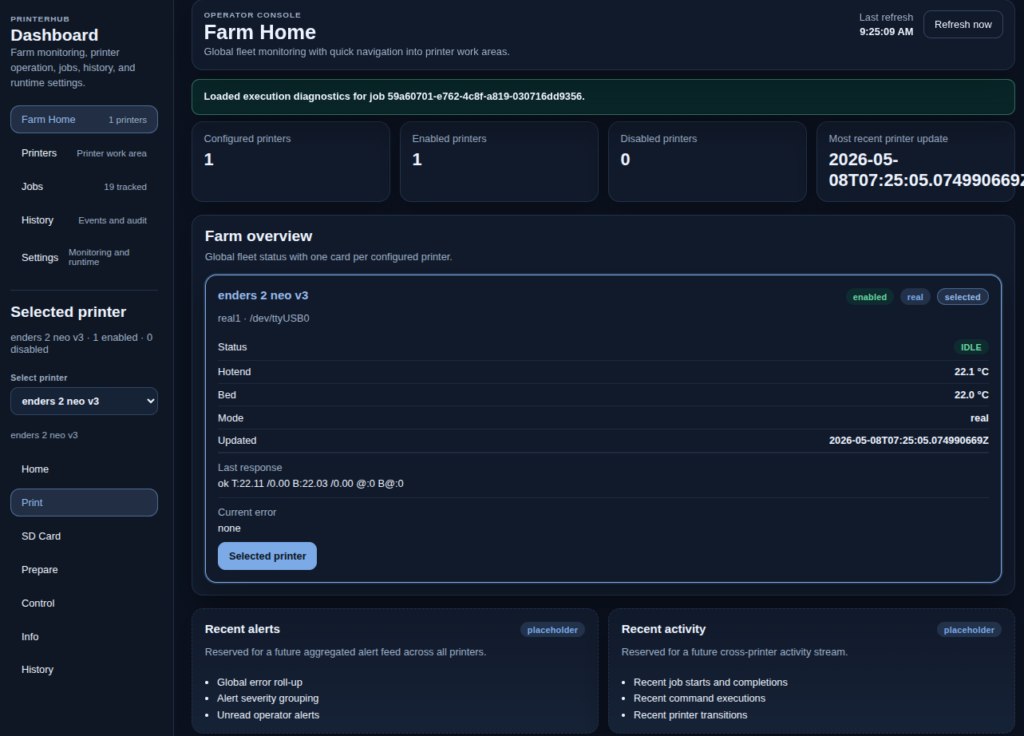
    SpaghettiChef is a Java-based local runtime for monitoring and controlling 3D printers through a structured dashboard, REST API, persistence layer, and real serial communication.

    It started with one USB-connected printer and is evolving into a local multi-printer control system with background monitoring, job execution, audit visibility, and real-printer diagnostics.

    Why I built it

    A 3D printer is not just a machine with a start button. Behind the scenes, there are serial commands, firmware responses, timeouts, SD-card transfers, failed uploads, and operator actions that should be traceable.

    PrinterHub explores how this can be handled like a real system: monitored, persisted, observable, and controlled.

    What it does

    • Monitors real and simulated 3D printers.
    • Reads printer state in the background without blocking the dashboard.
    • Provides a local REST API and embedded dashboard.
    • Stores printer configuration, events, jobs, and diagnostics in SQLite.
    • Runs controlled actions such as temperature readout, homing, fan control, and SD-card print workflows.
    • Tracks job history, execution steps, command responses, and failure details.
    • Tests real Marlin-compatible serial communication, including guarded SD-card upload.

    Real hardware, real problems

    PrinterHub is tested against a physical Marlin-compatible 3D printer. That means the project does not only simulate the happy path. It deals with real serial behavior: slow transfers, resend requests, timeouts, checksum handling, and firmware-specific quirks.

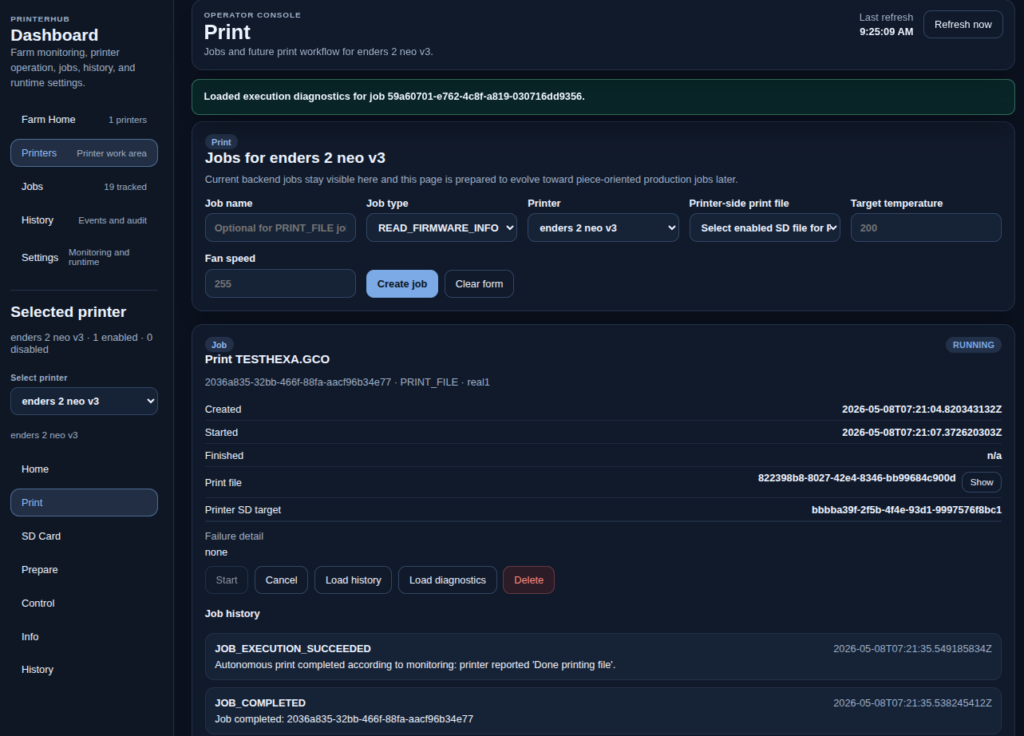
    Real printer / dashboard screenshot placeholder PrinterHub is developed against real printer communication, not only simulation.

    Dashboard idea

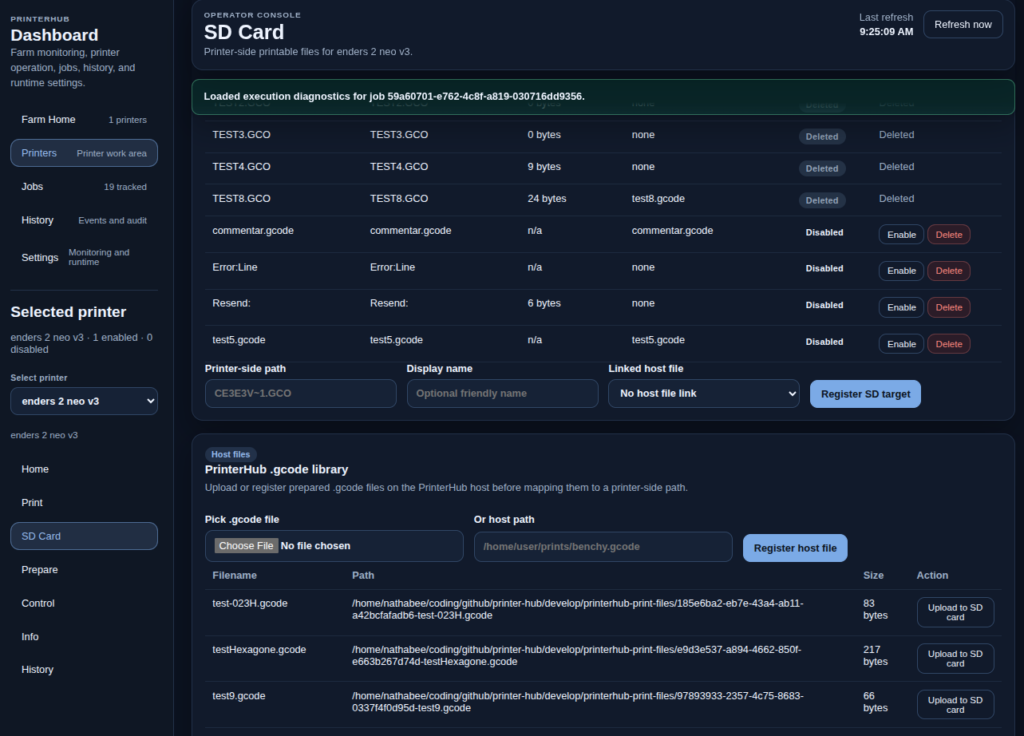
    The dashboard is built around two views: the printer farm as a whole, and the selected printer workspace. From there, the operator can inspect status, manage SD-card files, start controlled jobs, review history, and diagnose what happened.

    Tech stack

    Java 21, Maven, SQLite, REST API, embedded dashboard, serial communication, simulation modes, Jenkins CI, and Windows/Linux runtime administration scripts.

    Project direction

    The goal is to move from a single USB-connected printer toward a structured local printer runtime — and later toward multi-printer or multi-site orchestration.

    SpaghettiChef is a practical system integration project: hardware communication, backend runtime design, persistence, dashboard UX, job execution, diagnostics, and DevOps in one project.

  • Introducing BeeLab

    beelab Project Portal

    Welcome to BeeLab, my experimental platform for integrating multiple technologies into a single Dockerized environment.
    The project is open source: GitHub – nathabee/beelab

    Github Documentation : https://nathabee.github.io/beelab/index.html


    🔧 What’s inside BeeLab?

    BeeLab runs four main services, each in its own Docker container:

    • Django API (Python 3.12, Gunicorn)
      Core backend for data models and API endpoints.
      Swagger API Explorer
    • WordPress (Dockerized)
      A separate WP instance to showcase custom plugins and theme integration.
      BeeLab WordPress
    • Databases
      PostgreSQL for Django and MariaDB for WordPress.

    🔌 Custom WordPress Plugins

    BeeLab includes three original plugins that extend WP with features tied to the Django backend:

    1. BeeFont WP
      WordPress plugin to create your own font using SVG or PNG editor
    2. PomoloBee WP
      Connects to the PomoloBee module inside Django and displays farm/field data.
    3. Competence WP
      Adds competence-related content and interacts with Django data.

    🌍 Why Docker?

    • Each service is containerized and isolated.
    • Easy to run locally, or deploy to a VPS.
    • Clear port mapping for testing (Django 9001, Web 9080, WP 9082).
    • Can later be placed behind Apache/Nginx + HTTPS with subdomains.

    🚀 Try it out


    👉 This project is still work in progress, but the basic stack is up and running.
    Feedback and ideas are very welcome!

  • Introducing BeeFont

    BeeFont — Design Fonts, Letter by Letter

    BeeFont is a WordPress plugin for creating real fonts by drawing SVG vector glyphs directly in the browser.

    You design letters in a clean, focused editor, refine their shapes, and generate a standard TTF font you can install and use anywhere.


    What You Can Do with BeeFont

    • Draw and edit letters as SVG vectors
    • Fine-tune curves, strokes, and proportions
    • Manage glyphs visually and iterate on their design
    • Build and download a finished font file

    The workflow stays simple and intentional, from the first sketch to the final font.


    How It Works

    1. Create a font project
    2. Draw letters in the SVG glyph editor
    3. Adjust and refine as needed
    4. Build and download your font

    Part of BeeLab

    BeeFont is part of the BeeLab ecosystem and connects a modern WordPress interface with a dedicated backend for font generation.

    It is designed for people who care about letterforms and want a practical, hands-on way to create their own type.


    BeeFont
    Designed by Nathabee