
BeeDashboard — Dashboard in Motion
BeeDashboard is a WordPress plugin that turns your website into a rotating information dashboard for TVs and wall displays. Cards are arranged in a grid, can rotate automatically, and can also remain permanently visible when needed.
Introduction
Instead of building a custom kiosk application, BeeDashboard lets you assemble a dashboard using normal WordPress content. Cards are displayed in a grid, update automatically, and can combine permanent information with rotating content.
Typical uses include:
• family dashboards in the kitchen or living room
• office wall displays
• news and radio screens
• information kiosks
• smart-home dashboards
Because it runs directly inside WordPress, updating your dashboard is as simple as editing a page or creating a new card.
Demo
There is a live BeeDashboard running on my server. Open it : https://nathabee.de/beedashboard-demo/
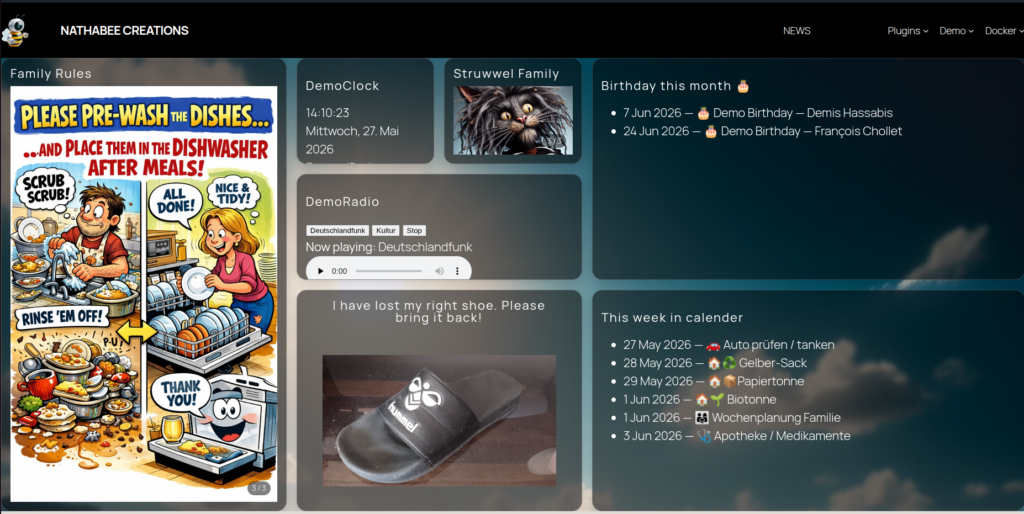
Key Features
BeeDashboard focuses on simplicity, stability, and readability on large screens.
Features include:
• rotating dashboard cards
• fixed cards that remain always visible
• configurable grid layouts
• RSS news feed cards
• internet radio player cards
• weather and calendar cards
• fuel price cards
• traffic travel-time cards
• provider profiles for API keys and external services
• REST-powered live updates (no page reload)
• optimized for TVs and wall displays
The plugin works in any modern browser, including smart TVs and kiosk browsers.
How BeeDashboard Works
BeeDashboard is built around three simple concepts.
Boards
Boards represent a dashboard screen.
Examples:
family-tv
kitchen-display
office-wall
Cards
Cards are individual pieces of content displayed on the board.
Examples:
• family message
• RSS news feed
• radio player
• weather information
• calendar events
• clock
• fuel prices
• travel time
Cards can belong to multiple boards.
Board Block
The BeeDashboard block displays a board inside a WordPress page.
Once placed on a page, the dashboard automatically loads and updates.
Fixed and Rotating Cards
BeeDashboard boards can contain two types of cards.
Fixed cards remain permanently visible on the dashboard.
Typical examples:
Clock
Radio
Weather
Rotating cards appear during the automatic rotation cycle.
Typical examples:
News
Calendar
Fuel prices
Traffic travel time
This allows a dashboard to show essential information continuously while rotating additional cards.
fixed
fixed
fixed
rotating
rotating
rotating
rotating
rotating
Visual Architecture
BeeDashboard uses a simple architecture: WordPress stores boards and cards, the frontend loads a board scene, and provider-backed cards fetch data on the backend.
displays the dashboard page
loads the board scene via REST
combines fixed cards + rotating cards
manual, news, radio, weather, calendar, fuel, traffic
API keys, refresh defaults, credentials
fuel prices
travel time
weather
Example Dashboard Setup
Typical workflow:
- Create a board
BeeDashboard Cards → Boards → Add New
Example:
family-tv
- Create cards
BeeDashboard Cards → Add New Dashboard Card
Examples:
• News
• Radio
• Weather
• Family message
• Fuel
• Traffic
Assign each card to the board.
- Create the dashboard page
Create a WordPress page and insert the block:
BeeDashboard Board
Configure the block settings:
• board
• grid size
• rotation speed
• scene refresh interval
- Configure provider profiles if needed
Settings → Bee Dashboard
Use this for external services such as fuel price or routing cards.
- Open the page on a TV
Open the page in a browser and enable fullscreen.
The dashboard will update automatically.
Card Types
BeeDashboard supports multiple card types.
Manual cards display content directly from the WordPress editor.
Other card types display dynamic content from feeds or APIs.
Available types:
Manual
News (RSS feeds)
Radio (internet radio streams)
Weather
Calendar
Calendar List (upcoming events)
Clock
Fuel prices
Traffic travel time
Additional card templates and visual configuration tools will be added in future versions.
Provider Profiles
Some cards use external services such as fuel price APIs or routing services.
BeeDashboard stores these credentials in provider profiles.
Provider profiles store:
• API keys
• refresh policies
• authentication settings
Profiles are configured in:
Settings → Bee Dashboard
This allows cards to reference a profile without storing credentials directly.
Example: News Feed Card
A news card displays headlines from an RSS feed.
Example source:
Deutschlandfunk Nachrichten
Create a dashboard card and add the custom field:
dim_card_type = newsOptional feed source:
dim_source_url = https://www.deutschlandfunk.de/nachrichten-100.rssThe card will automatically fetch and display the latest headlines.
More configuration examples are available in the plugin documentation.
Download
The plugin is available on WordPress.org.
Development versions can also be downloaded from GitHub.
Open source repository: https://github.com/nathabee/bee-dashboard
Screenshots
Screenshots will be added before publishing.
BeeDashboard running on a TV
WordPress editor with BeeDashboard block
Fixed and rotating cards together
Fuel and traffic cards
Using BeeDashboard on a TV
BeeDashboard is designed for large displays.
Typical setup:
1. Open the dashboard page on a TV browser
2. Enable fullscreen
3. Leave the page open
The dashboard updates automatically and is suitable for browser-based kiosk environments.
It works well with:
Android TV browsers
Samsung Frame TV
kiosk browsers
wall-mounted tablets
Project Philosophy
BeeDashboard follows a few core design principles:
• dashboards should stay readable on large screens
• configuration should remain simple
• WordPress should stay in control of styling
• dynamic content should load without refreshing the page
• external services should remain backend-driven
The goal is to make WordPress capable of acting as a lightweight dashboard system without introducing heavy external software.
Author
BeeDashboard is developed by Nathabee.
More projects: